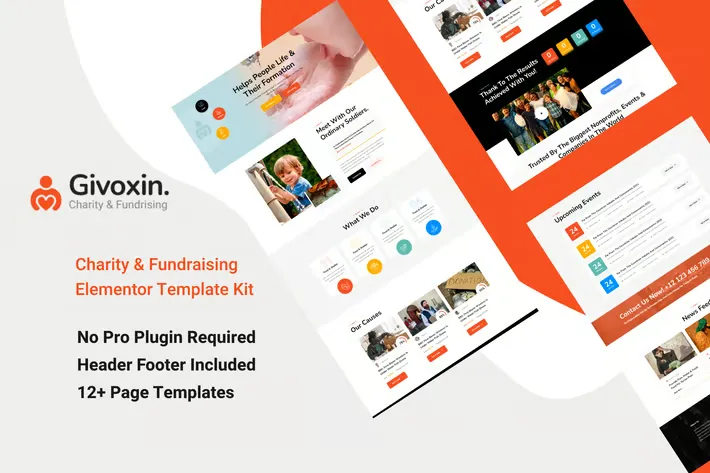
Givoxin clean professional Charity Elementor Template Kit which fits for all kinds of charity, fundraising, nonprofit, NGO, donations, and all other non-profit charity websites, businesses, and NGOs. It has a purpose-oriented design, responsive layout, and special features like Home page, blog layouts, Causes, and Event.
Features:
- Clean, Professional design
- Responsive to different devices
- Build with Elementor page builder
- Google fonts
- Social links
Templates:
- Global Styles
- Page – Home
- Page – About
- Page – Mission
- Page – Team
- Page – Gallery
- Page – Faq
- Page – Event
- Page – Event Details
- Page – Causes
- Page – Cause Details
- Page – Contact
- Section – Header
- Section – Footer
Required Addons
- Elementor
- ElementsKit Lite
- Essential Addons for Elementor
- Elementor Header & Footer Builder
- MetForm
How to Import Metforms
- Import the metform block templates
- Import the page template where the form appears and right-click to enable the Navigator
- Locate and select the Metform widget and click Edit Form. Choose New, then Edit Form. The builder will appear
- Click ‘Add Template’ grey folder icon.
- Click ‘My Templates’ tab.
- Choose your imported metform template, then click ‘Insert’ (click No for page settings).
- Once the template is loaded, make any desired customizations and click ‘Update & Close’ The form will appear in the template
- Click Update
Setup Global Header and Footer in Header Footer & Blocks plugin
Only if you do not have Elementor Pro.
- Import the header and footer template
- Go to Appearance > Header Footer and click Add New button
- Give it a title and select Header, Display on Entire Site and click Publish
- Click Edit with Elementor
- Click the gray folder icon to access My Templates tab and select the header template to import and Update.
- Repeat for Footer











Reviews
There are no reviews yet.