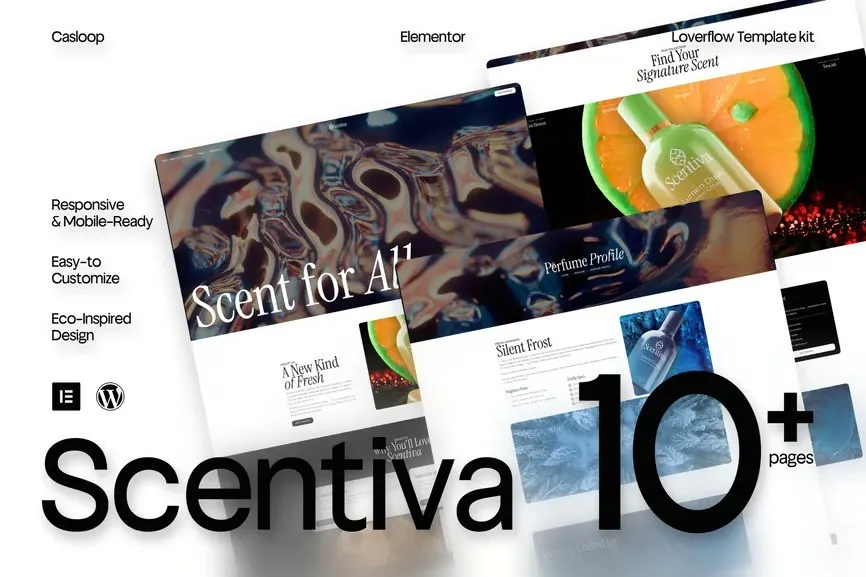
Scentiva is an elegant and expressive Elementor template kit, curated for perfume brands, beauty labels, and fashion-forward creators who believe visuals should feel like scent — soft, luxurious, and unforgettable.
Crafted with artful layering, editorial elegance, and modern fluidity, Scentiva brings experimental beauty to life on every scroll. Think: floating type, expressive whitespace, and layouts that breathe. It’s where high fashion meets lightweight code — and your brand becomes a feeling.
Responsive, mobile-friendly, and powered by Elementor Free, Scentiva lets your story unfold like a fragrance: slowly, beautifully, and full of presence.
Features Specification:
- Built with Elementor Free (no pro required)
- Fully responsive on all screen sizes
- Light-weight design for fast loading
- Artistic, editorial-style layout
- Designed for perfume, fashion, and beauty brands
- Elegant typography & floating visual composition
- Easy to customize — no code needed
- Perfect for campaigns, product launches, or brand storytelling
- Includes hero sections, product galleries, about pages, and contact forms
- Casloop-crafted with visual emotion
Pages Included:
- Home
- About Us
- Perfume
- Pefume Profile
- Pricing
- FAQs
- Essence Makers
- 404 Page
- Thank You
- Contact Us
Blocks Included:
- Header
- Footer
Included Plugins:
- Elementor
- Jeg Elementor Kit
- Met Form
- ElementsKit
How to setup header in Jeg Elementor Kit plugin If you have Elementor Pro, headers and footers may be customized under Theme Builder.
- Go to Jeg Elementor Kit menu item > Header Template
- Click Add New Header
- Add condition > All Site and click Create
- Click the pencil icon to Edit and elementor will appear
- Click gray folder icon to access My Templates tab
- Insert the header template.
- Customize and Save.
How to Import Metforms If you have Elementor Pro, skip install of Metform and form blocks.
- Import the metform block templates
- Import the page template where the form appears and right-click to enable the Navigator
- Locate and select the Metform widget and click Edit Form. Choose New, then Edit Form. The builder will appear
- Click ‘Add Template’ grey folder icon.
- Click ‘My Templates’ tab.
- Choose your imported metform template, then click ‘Insert’ (click No for page settings).
- Once the template is loaded, make any desired customizations and click ‘Update & Close’ The form will appear in the template
- Click Update











Reviews
There are no reviews yet.