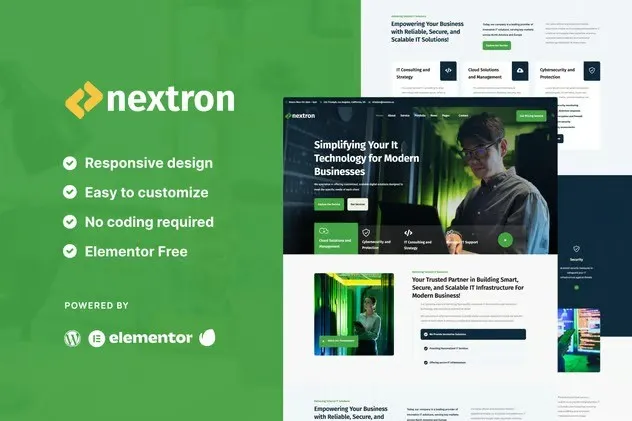
Introducing Nextron – a sleek and easy-to-use template kit designed for modern tech companies. Nextron helps you create professional websites quickly, with layouts and features that fit your business needs perfectly. Whether you’re launching a startup or upgrading your company’s online presence, Nextron offers a simple yet powerful way to showcase your brand and services. Boost your business with Nextron and make a strong impression effortlessly!
Key Features:
Modern and Professional Design:
Vevent – Event Organizer & Management Elementor Template Kit features a vibrant and well-organized layout that highlights creativity and reliability – ideal for modern event websites.
Fully Responsive:
Looks great on all devices – desktops, tablets, and smartphones. The layout adjusts seamlessly for the best user experience everywhere.
Easy Customization with Elementor:
No coding skills needed! Modify every section easily using Elementor’s intuitive visual editor. Customize colors, fonts, content, and more to fit your brand.
Optimized for Performance:
Enjoy fast loading times and a lightweight structure that’s designed with SEO and performance in mind.
Cross-Browser Compatibility:
Compatible with all major browsers including Chrome, Firefox, Safari, and Edge.
No Pro upgrade required
Template Pages Included:
- Homepage
- About
- Booking Form
- Contact Form
- Contact
- News
- Newsletter Form
- Portfolio
- Service
- Single 404
- Single News
- Header
- Footer
- Global Style
Template Features:
- No Pro Plugin Needed
- True No Coding Required
- Global Theme Style
Required Plugins installed with kit
Creating pages
- Go to Pages and create a new page and click Edit with Elementor
- Click the gear icon at lower-left of the builder to view page settings and choose Elementor Full Width and hide page title
- Click the gray folder icon to access My Templates tab and then Import the page you’d like to customize.
- The home page is set under Settings > Reading by selecting Static Front Page.
If you have Elementor Pro, headers and footers are customized under Templates > Theme Builder.
Setup Global Header and Footer in ElementsKit
- Import the header and footer template
- Go to ElementsKit > Header Footer select Header and click Add New
- Give it a title, leave Entire Site selected and toggle Activation to On
- Click the template title and Edit Content
- Click the gray folder icon and select the header template to import and Update.











Reviews
There are no reviews yet.