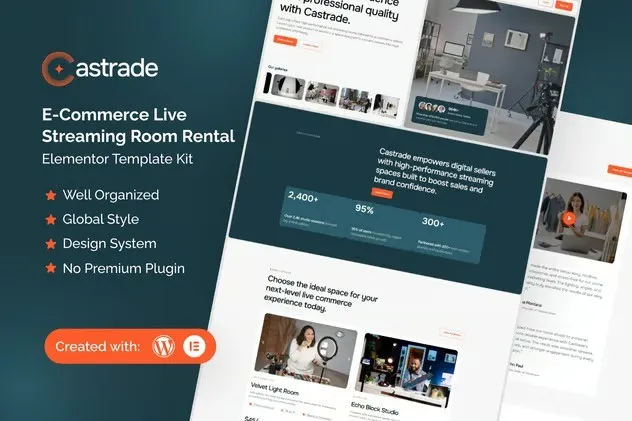
Introducing “Castrade” – Your go-to solution for launching a modern, high-performing website in the Live Streaming Room Rental space!
Created for digital entrepreneurs, studio owners, and streaming service providers, Castrade empowers you to build a compelling and conversion-focused online presence with the power of Elementor and WordPress. Whether you’re renting out streaming rooms, managing virtual event spaces, or enabling live commerce, Castrade delivers a sleek, responsive design that’s optimized for user engagement and business growth.
Equipped with a complete set of 23 templates, Castrade provides everything you need to promote, book, and showcase your services. Stand out with lead generation-optimized layouts, clean typography for superior readability, and a fully responsive experience that adapts flawlessly to all screen sizes. Enjoy premium usability features like one-click back-to-top navigation and seamless browser compatibility, all built on a consistent design system for easier customization and maintenance.
Take your streaming rental business to the next level with Castrade – where visual clarity meets marketing performance, and every design decision is made to support your success in the booming live event and e-commerce broadcasting industries.
Suitable For:
- Virtual Showroom Services
- Online Product Launch Venues
- Live Commerce Studios
Features:
- Modern & Professional Design for E-Commerce Live Streaming Room Rental
- Consistent Design System-based Layouts
- 21+ ready to use templates
- Unlimited colors
- More than 900 ready fonts
- Fully Responsive Layout
- Fully Customizable via Elementor Drag-and-Drop Builder
- Click to Go To Top
- Cross Browser Compatibility: Chrome, Firefox, Safari, Opera
Templates Include:
- Global Theme Style
- Design Guideline
- Homepage
- About Us
- Subscribe Blog Form
- Review Form
- Contact Us
- 404
- Single Post
- Our Blog
- FAQ
- Reviews
- Career
- Locations
- Book A Room
- Clients
- Pricing
- Facilities
- Room Detail
- Room List
- Subscription Form
- Booking Form
- Footer
- Header
Required Plugin(included):
- Elementor
- The Plus Add-on
- ElementsKit Lite
- Gum Elementor Kit
- Metform
How to Import MetForm Custom Form:
- While edititing a page where a form should appear, open the Elementor navigator to locate the Metform widget.
- Click Edit Form in the builder panel.
- Select New, leave blank selected then click Edit Form button.
- Click ‘Add Template’ grey folder button.
- Click ‘My Templates’ tab.
- Choose your imported MetForm template, then click ‘Insert’.
- Once the template is loaded, click ‘Update’.
Setup Header in ElementsKit Lite
If you have Elementor Pro, setup headers and footers in Theme Builder. Pages you create with Elementor must have the Page Layout set to Elementor Full width for the global header and footer to appear.
- Go to ElementsKit > Header Footer
- If prompted to go through the wizard, click Next all the way through and then return to step 1 (you are not required to enter your email address or share your information)
- Click Add New Template button at the top
- Name your template, then toggle “Activate/Deactivate:” to On
- Click the gray Edit Content button. Elementor will open.
- Click the gray folder icon to access My Templates tab and Insert the header or footer template.
- Customize and Publish











Reviews
There are no reviews yet.