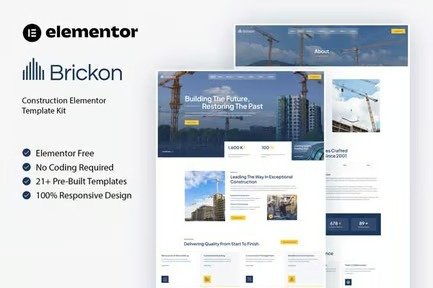
Brickon is a sleek and professional Elementor Template Kit tailored for
construction companies, contractors, and building services businesses aiming
to establish a modern online presence. Designed with precision and
adaptability in mind, Brickon offers fully responsive layouts that deliver an
exceptional user experience on all devices.
This comprehensive template kit includes beautifully crafted pages to showcase
your services, highlight projects, and introduce your team effortlessly. With
its clean design and seamless customization using Elementor, Brickon
eliminates the need for coding, enabling you to focus on growing your
business. Build trust and attract clients with Brickon, the perfect
solution for the construction and building industry.
Features:
- Great for Construction & Building Service
- Fully With Elementor Free Version (Elementor Pro is not required)
- Simple, Modern and Clean Design
- No Coding Knowledge Required
- 21+ Ready To Use Templates
- Easy & Fully Customizable
Templates Include:
- Global Kit Styles
- Home
- About
- Services
- Service Detail
- Projects
- Project Details
- Pricing
- Our Team
- Career Details
- Career
- Tabs
- Blog
- Single Blog
- Contact
- FAQ
- Coming Soon
- Metform Contact
- Footer
- Header
- 404 Page
Plugins installed with kit:
How To Import Metform Costum Form
- Import metform template
- Import the template where the form appears, then edit in Elementor
- Click the Metform widget in the column where the form should be and click
Edit Form - Select New, leave blank selected then click Edit Form button
- Click ?Add Template? grey folder button
- Click ?My Templates? tab
- Choose your imported metform template, then click ?Insert?
- Once the template is loaded, click ?Update?
How to setup header in Jeg Elementor Kit plugin If you have
Elementor Pro, headers and footers may be customized under Theme Builder.
- Go to Jeg Elementor Kit menu item > Header Template
- Click Add New Header
- Add condition > All Site and click Create
- Click the pencil icon to Edit and elementor will appear
- Click gray folder icon to access My Templates tab
- Insert the header template.
- Customize and Save.











Reviews
There are no reviews yet.