Welcome to Deko!
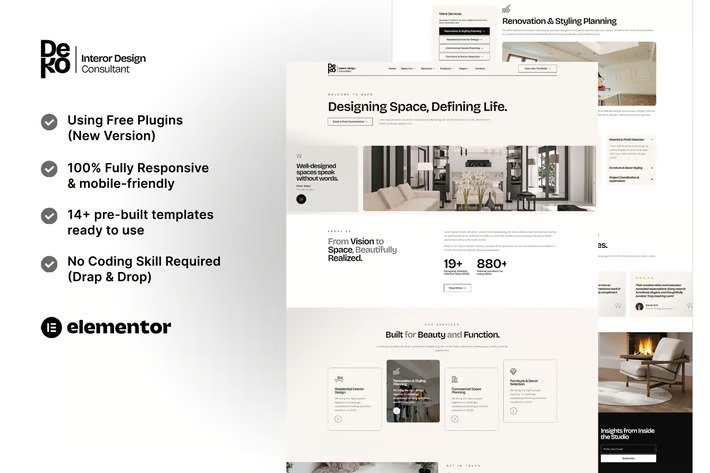
Deko is a bold, minimalist, modern and unique Elementor kit crafted to interior design consultants, interior designers, architects, and creative studios. Built with clean aesthetics and intuitive structure, it’s perfect for professionals seeking a stylish and functional online presence.
Fully customizable with Elementor, this kit includes elegantly designed pages that highlight your portfolio, services, team, and process—ensuring your brand stands out with sophistication and clarity. This kit has a unique design with a 100% fully responsive layout, easy installation, and sure very easy to customize. Save your time to make professional Wesite with this elementor kit. Just drag and drop, no coding required.
This Template Kit contains page content for creating Elementor pages. This kit has been optimized for use with the free “Hello Elementor” theme. And this template uses Plugin with New Version.
In case you have already purchased and you happen to have some questions about it, feel free to visit our Support Center where our support team will be more than glad to help you out.
Features :
- 100% Responsive & Mobile-friendly
- Modern Clean Design
- Easy to Edit & Customize
- 14+ pre-built templates ready to use
- Built with Hello Elementor Theme
- Customize fonts and colors in one place (Global Kit Style)
Templates Include :
- Home
- About Us
- Our Team
- Services
- Service Detail
- Projects
- Project Detail
- Our Process
- Pricing
- Testimonials
- FAQ
- 404 Page
- Contact
- Header
- Footer
- Deko Booking MetForm
- Deko Contact MetForm
- Deko Subscribe MetForm
Addons Installed with Kit:
- Elementor
- ElementsKit Lite
- MetForm
For further support, go to Elementor > Get Help in WordPress menu.
- First, be sure you’ve Imported the form blocks from Template-Kit.
- Click on “Metform” > Forms in the admin menu
- Click “Add New”
- Enter a “Form Name” and then Click “Save and Edit”
- On the Elementor canvas, Click the gray folder icon to access “My Templates tab” and then choose the block of Forms you’d like to import with Click Insert.
- Next, you can customize the forms by setting the widget as you like or just leave by default.











Reviews
There are no reviews yet.