Incuvate – Startup Incubator Elementor Template Kit for Startup Growth
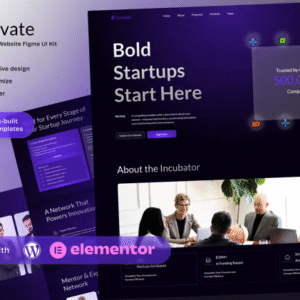
Incuvate is a bold and dynamic Elementor Template Kit designed for startup incubators, accelerators, innovation hubs, and growth programs. Its modern layout and professional design help showcase startup mentorship, funding opportunities, and program benefits with clarity and impact.
Ideal for organizations that support tech startups, entrepreneurship programs, or early-stage investment platforms, Incuvate gives you a fast and customizable foundation to present your value, attract applicants, and share success stories—without touching code.
Key Features:
- 16+ ready to use page templates
- Easy customization with Elementor
- Optimized for SEO & lead generation
- Using Free Plugins (Elementor Pro is not required)
- Cross Browser Compatibility: Chrome, Firefox, Safari, Opera
- Built with Free Plugins No premium add ons required, making setup hassle free.
- 100% Fully Responsive & mobile friendly
- Customize fonts and colors in one place (Global Kit Style)
- One Click Installation Import demo content easily with the Envato Elements plugin.
- Fast loading, clean code, and cross-browser compatible.
- Elegant UI/UX structure
- Easy Customization: Utilize Elementor’s drag-and drop interface to personalize your site.
Templates in Zip:
- Home
- About the Incubator
- Programs & Benefits
- Startup Portfolio
- Mentors & Advisors
- Funding & Resources
- Application Process
- Events & Workshops
- Blog & Insights
- Contact Us
- Single Post
- 404 Error
- Coming Soon
- Header
- Footer
Required Plugins:
- Elementor
- MetForm
- ElementsKit Lite
- Ultimate Addons for Elementor
- RTMKit Addons for Elementor
- Prime Slider
Creating pages:
- Go to Pages and create a new page and click Edit with Elementor
- Click the gear icon at lower-left of the builder to view page settings and choose Elementor Full Width and hide page title
- Click the gray folder icon to access My Templates tab and then Import the page you’d like to customize.
- The home page is set under Settings > Reading by selecting Static Front Page.












Reviews
There are no reviews yet.